
Global Landmarks & Borders Challenge
What players say
Global Landmarks & Borders Challenge strips geography practice down to one repeated task: see a highlighted country, type its name. The lack of multiple-choice options raises the difficulty compared to recognition-based quizzes, while the absence of a timer keeps pressure low. Immediate feedback after each answer helps players correct mistakes quickly. The browser-only format works on most devices, though it offers no account system or saved progress. Best suited to learners who want to strengthen country-name recall at their own pace.
About
Typing Countries on a Map
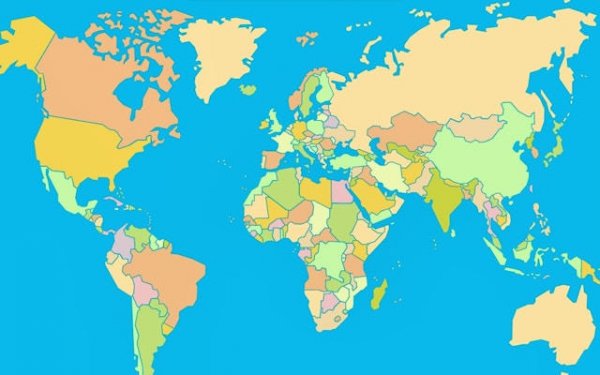
The core task is straightforward: a country is highlighted on a world map, and you type its official name into a text field. There are no multiple-choice options, so recall comes directly from memory. That constraint is the point — it forces you to connect a nation's outline with its name rather than simply recognizing the right answer among four choices. [IMG_1]
How Scoring and Feedback Work
Correct answers move you forward without penalty. Mistakes lower your potential maximum score, which rewards careful thought over speed. After each submission, the game tells you whether you were right or wrong, so you can correct your mental map immediately. The loop of attempt, feedback, and correction is what builds retention over time. Guessing is allowed, but it costs you accuracy points.
Playing Without Time Pressure
There is no countdown clock. You can examine each highlighted country for as long as you need before typing an answer. That makes the game usable for beginners who are still learning where countries are, and for advanced players who want to test recall without racing a timer. The self-paced format also reduces the anxiety that timed quizzes often create. [IMG_2]
Browser Access and Device Support
The game runs entirely in a web browser. No download, installation, or account creation is required. It adapts to different screen sizes, so it works on desktop computers, tablets, and smartphones. The text input field is simple, and the map display stays clear even on smaller screens. That makes it practical for classrooms, home study, or quick sessions on a phone.
Compatibility
FAQ
Comments
Sign in to comment
You must be logged in before posting a review or rating.
No comments yet. Be the first to comment!








Editorial Notes