
Traffic Runner Pro
What players say
Traffic Runner Pro succeeds by narrowing its scope: instead of open-world driving or circuit racing, it asks you to survive a busy highway. The steady difficulty ramp and car upgrades give each run a sense of purpose, while keyboard and touch support make it accessible. It suits players who enjoy reflex-driven arcade challenges. The main limitation is that the concept stays close to its core mechanic, so those seeking deep simulation or varied modes may find it repetitive.
About
Weaving Through Live Traffic
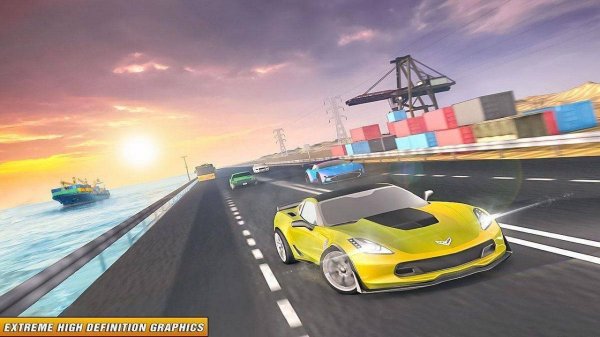
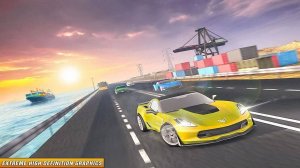
Traffic Runner Pro drops you onto a multi-lane highway behind the wheel of a high-performance vehicle. The goal is to reach the finish line by threading through a continuous flow of cars, trucks, and obstacles. Unlike circuit racing, there is no fixed track to memorize. Each session generates a new arrangement of vehicles, so you must constantly scan the road ahead and adjust your lane position. The game rewards holding a steady speed while transitioning smoothly between lanes, turning every run into a test of spatial awareness and real-time decision-making.
Choosing and Tuning Your Car
Before each run, you select from several modified cars. Each vehicle has distinct handling, acceleration, and top-speed characteristics. Completing runs and meeting specific targets unlocks performance upgrades. Some upgrades improve grip for sharper lane changes, while others boost engine output for faster straight-line speed. This lets you fine-tune a car to match your driving style and the traffic conditions you expect to face.
How Traffic Density Changes
Early stages feature sparse traffic with predictable gaps, giving you room to learn the controls. As you advance, traffic becomes denser and faster, and AI drivers begin making sudden lane changes. The difficulty curve pushes you to anticipate rather than react. Success depends on reading the flow of traffic and making split-second decisions without losing momentum.
Presentation and Controls
Realistic graphics create a detailed highway environment with lane markings, roadside barriers, and varied vehicle models. Engine sounds, tire screeches, and ambient traffic noise reinforce the sense of speed. A clean interface shows your speed and distance without cluttering the screen. The game supports keyboard and touch input, with smooth steering for precise lane changes. Acceleration and braking are tuned so you can feather the throttle and brake gently, helping you maintain stability when approaching a cluster of vehicles.
Compatibility
FAQ
Comments
Sign in to comment
You must be logged in before posting a review or rating.
No comments yet. Be the first to comment!
Editorial Notes