
Cue Ball Arena: Online Match Play
What players say
Cue Ball Arena delivers standard 8-ball in a browser, with real-time matchmaking that pairs you against similar-ability opponents. The two-step aiming and power system, along with simulated collisions and spin, gives shots a realistic feel. Short matches and touch controls suit mobile play. The main limitation is the absence of described practice or offline modes, so improvement depends on live matches. It suits players wanting quick, competitive pool without installing software.
About
Real-Time 8-Ball in a Browser
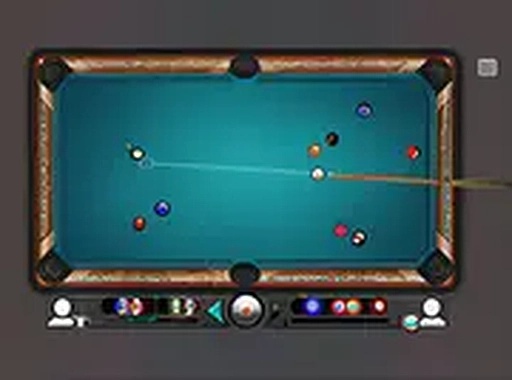
Cue Ball Arena is an online 8-ball game that runs entirely in a web browser, so there is nothing to download or install. Each match connects you with another player through a matchmaking system that pairs you against an opponent of similar ability. After the opening break, you are assigned either the solid-colored balls or the striped group. Your objective is to clear your designated set and then legally pocket the black ball before your rival does. The rules follow standard 8-ball conventions, so anyone familiar with the game can start playing without reading lengthy instructions.
Aiming, Power, and Turn Flow
Taking a shot requires two actions: aiming and selecting power. You rotate the cue around the cue ball with your mouse or finger to line up the desired angle, then use an on-screen power slider to choose how hard to strike. Release to shoot and watch the ball roll across the felt. The game simulates realistic ball collisions and spin, so even subtle adjustments to aim or power can change the outcome. After each shot, the turn passes to your opponent unless you pocket one of your own balls legally.
Thinking Beyond the Current Shot
Success depends on more than potting balls. You must plan where the cue ball will end up after contact. A well-placed cue ball can set up an easy next shot, while a careless one might leave your opponent an opening. Defensive play, such as leaving the cue ball behind a cluster or near a rail, can force errors from the other player. Over time, you learn to read the table, anticipate angles, and control the pace of the game.
Accessible Design and Short Sessions
The game works on desktop computers, tablets, and smartphones, with touch controls optimized for smaller screens. A full-screen mode is available for a more focused view. Matches are quick, often lasting just a few minutes, making the game suitable for short breaks or longer sessions. The interface is clean and straightforward, so new players can start a match without reading lengthy instructions.
Improving Through Observation
Improving at Cue Ball Arena comes from practice and observation. Pay attention to how the cue ball reacts after contact with other balls and the cushions. Experiment with different power levels to see how speed affects ball paths. Watch how experienced opponents set up their shots and try to replicate their patterns. Over many games, you will develop a feel for the table, learning when to play aggressively and when to play safe. The game rewards patience and careful planning as much as quick reflexes.
Compatibility
FAQ
Comments
Sign in to comment
You must be logged in before posting a review or rating.
No comments yet. Be the first to comment!








Editorial Notes