
Survival Defender City
Developer: Aluminum Weaver Works
Published: 2026-09-30
Updated: 2026-09-30
What players say
Survival Defender City offers a focused action survival loop: move, aim, attack, and collect health while creatures pressure you from all sides. The mix of ranged and close-combat tools gives players a real choice in how they handle threats. Its browser-based, desktop-only design makes it easy to start but limits play to keyboard and mouse setups. The difficulty curve rewards practice and pattern recognition, making it suitable for players who enjoy short, skill-based survival challenges.
About
Defending an Overrun City
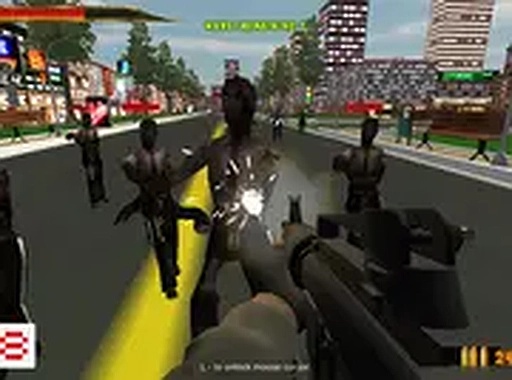
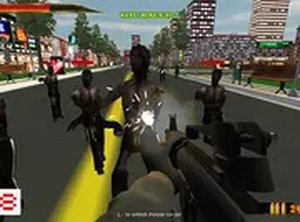
Survival Defender City places you in a city that has been taken over by aggressive, uncontrollable creatures. Your only goal is to survive by eliminating every creature you encounter. The game is played in a web browser on desktop, so there is no download or installation required. Full screen mode is available for a more focused view of the action. Because the setting is a city, you move through streets and open areas while creatures approach from different directions, which keeps pressure on your positioning at all times.
Controls and Combat Tools
You control your character with a keyboard and mouse. Movement uses arrow keys or WASD, while aiming and attacking are handled with the mouse. Clicking uses your currently equipped tool or item against creatures. The game offers both ranged options for attacking from a distance and close-combat tools for when creatures get near. Health pickups are scattered throughout the city and restore energy when collected. Switching between ranged and melee approaches is a practical decision based on how close the creatures are and how much space you have to move.
Staying Alive Under Pressure
Survival depends on constant movement and awareness. Creatures have different attack patterns, and learning them helps you avoid damage. Staying mobile prevents you from being surrounded, which is one of the main ways a run ends. Health items are limited, so collecting them whenever possible keeps your energy high. The game is easy to learn but challenging to master, making it suitable for short sessions. Regular practice improves your reflexes and helps you survive longer and achieve higher scores.Compatibility
• OS: Windows 10+, macOS 11+, iOS 14+, Android 10+
• Browsers: Chrome 100+, Safari 15+, Edge 100+, Firefox 100+
• Not compatible with Internet Explorer
Tested on real devices ✅ works as expected
FAQ
Is Survival Defender City free to play?
Yes, Survival Defender City is a free-to-play browser game. You can launch it directly in a web browser without downloading or installing anything. It is designed for desktop play, so a keyboard and mouse are required. There are no purchase requirements mentioned to access the core survival experience.
Can I play Survival Defender City on a mobile device?
The game is designed exclusively for desktop play. It relies on keyboard and mouse controls for movement, aiming, and attacking, which do not translate to touchscreens. Mobile browsers are not supported based on the available information. For the intended experience, use a desktop or laptop computer with a standard keyboard and mouse.
What is the main objective in Survival Defender City?
Your objective is to survive by overcoming every creature you encounter in a city overrun by aggressive creatures. You must stay alive as long as possible while taking down enemies. There is no mention of a final level or story ending, so the focus is on lasting longer and achieving higher scores through repeated attempts.
How do I restore health in Survival Defender City?
Health pickups are scattered throughout the city. Collecting them restores your energy, which is essential for surviving longer. Since creatures deal damage and health items are limited, you should grab them whenever possible. Prioritizing health pickups during calm moments can prevent a run from ending prematurely.
What tools can I use to fight creatures?
You can find items to attack from a distance or use tools for close combat. Ranged options let you hit creatures before they get near, while close-combat tools are useful when enemies close the gap. Experimenting with both helps you find what works for your playstyle and the situation at hand.
Does Survival Defender City have full screen mode?
Yes, full screen mode is available. It provides a more immersive experience by expanding the game view and reducing browser distractions. This can help you track creatures more easily and react faster. You can typically toggle it from the game interface or your browser's full screen option.
Comments
Sign in to comment
You must be logged in before posting a review or rating.
No comments yet. Be the first to comment!



Editorial Notes